 Ostov.js
Ostov.js is a fork of Backbone.js
without jQuery and Underscore dependencies. Native ES module, ES classes, full TypeScript support.
Ostov.js gives structure to web applications
by providing models with key-value binding and custom events,
collections with a rich API of enumerable functions,
views with declarative event handling, and connects it all to your
existing API over a RESTful JSON interface.
The project is hosted on GitHub,
and the annotated source code is available,
as well as an online test suite,
an example application,
a list of tutorials
and a list of real-world projects that use Ostov.
Ostov is available for use under the MIT software license.
You can report bugs and discuss features on the
GitHub issues page,
or add pages to the wiki.
Downloads & Dependencies
(Right-click, and use "Save As")
Ostov has no hard dependencies — it includes a minimal utility layer.
For DOM manipulation with Ostov.View,
optionally include jQuery ( >= 1.11.0) or a compatible library
such as Zepto.
ES Module & npm
Ostov is available on npm and ships as a native ES module —
there is no CommonJS build. Install it once and import directly in any
bundler (Vite, Rollup, webpack 5+) or in modern browsers via
<script type="module">.
npm install ostovjs
The default export is the Ostov namespace object. All major classes are
also available as named exports so you can import only what you need and
keep your bundle lean.
Default import — the full namespace:
import Ostov from 'ostovjs';

const Book = Ostov.Model.extend({
  defaults: { title: '', author: '' }
});

const book = new Book({ title: 'Dune', author: 'Herbert' });
console.log(book.get('title')); // "Dune"
Named exports — import only what you need:
import { Model, Collection, View, Router, Events } from 'ostovjs';

// Model
const Task = Model.extend({
  defaults: { done: false, title: '' }
});

// Collection
const TaskList = Collection.extend({ model: Task });

const tasks = new TaskList([
  { title: 'Write docs' },
  { title: 'Ship it' }
]);

console.log(tasks.length); // 2
Direct script tag (global Ostov variable):
<script src="ostov.js"></script>

<script>
  var Book = Ostov.Model.extend({
    defaults: { title: '', author: '' }
  });

  var book = new Book({ title: 'Dune', author: 'Herbert' });
  console.log(book.get('title')); // "Dune"
</script>
ES module directly in the browser:
<script type="module">
  import { Model, Collection } from './ostov.js';

  const Task = Model.extend({
    defaults: { done: false, title: '' }
  });

  const TaskList = Collection.extend({ model: Task });

  const tasks = new TaskList([
    { title: 'Write docs' },
    { title: 'Ship it' }
  ]);

  console.log(tasks.length); // 2
</script>
TypeScript Support
Ostov is written in TypeScript and provides first-class support for type safety via generics.
This allows your models and collections to have strict definitions for their attributes and data types.
Strongly Typed Models:
Pass an interface describing your attributes to Model<T>. This enables type checking for
get, set, and other methods.
interface BookAttrs {
  title: string;
  author: string;
  pages?: number;
}

class Book extends Model<BookAttrs> {
  defaults() {
    return { title: 'Unknown', author: 'Unknown' };
  }
}

const book = new Book({ title: 'The Hobbit' });
const title: string = book.get('title'); // OK
book.set('pages', 310);                  // OK
book.set('year', 1937);                  // Error: 'year' is not in BookAttrs
Typed Collections:
Specify the model type in Collection<TModel> to get typed models back from
at, get, and other collection methods.
class Library extends Collection<Book> {
  model = Book;
}

const library = new Library([book]);
const first: Book = library.at(0); // OK
Getting Started
When working on a web application that involves a lot of JavaScript, one
of the first things you learn is to stop tying your data to the DOM. It's all
too easy to create JavaScript applications that end up as tangled piles of
jQuery selectors and callbacks, all trying frantically to keep data in
sync between the HTML UI, your JavaScript logic, and the database on your
server. For rich client-side applications, a more structured approach
is often helpful.
With Ostov, you represent your data as
Models, which can be created, validated, destroyed,
and saved to the server. Whenever a UI action causes an attribute of
a model to change, the model triggers a "change" event; all
the Views that display the model's state can be notified of the
change, so that they are able to respond accordingly, re-rendering themselves with
the new information. In a finished Ostov app, you don't have to write the glue
code that looks into the DOM to find an element with a specific id,
and update the HTML manually
— when the model changes, the views simply update themselves.
Philosophically, Ostov is an attempt to discover the minimal set
of data-structuring (models and collections) and user interface (views
and URLs) primitives that are generally useful when building web applications with
JavaScript. In an ecosystem where overarching, decides-everything-for-you
frameworks are commonplace, and many libraries require your site to be
reorganized to suit their look, feel, and default behavior — Ostov should
continue to be a tool that gives you the freedom to design the full
experience of your web application.
If you're new here, and aren't yet quite sure what Ostov is for, start by
browsing the list of Ostov-based projects.
Many of the code examples in this documentation are runnable, because
Ostov is included on this page.
Click the play button to execute them.
Models and Views

The single most important thing that Ostov can help you with is keeping
your business logic separate from your user interface. When the two are
entangled, change is hard; when logic doesn't depend on UI, your
interface becomes easier to work with.
Model
- Orchestrates data and business logic.
- Loads and saves data from the server.
- Emits events when data changes.
View
- Listens for changes and renders UI.
- Handles user input and interactivity.
- Sends captured input to the model.
A Model manages an internal table of data attributes, and
triggers "change" events when any of its data is modified.
Models handle syncing data with a persistence layer — usually a REST API
with a backing database. Design your models as the atomic reusable objects
containing all of the helpful functions for manipulating their particular
bit of data. Models should be able to be passed around throughout your app,
and used anywhere that bit of data is needed.
A View is an atomic chunk of user interface. It often renders the
data from a specific model, or number of models — but views can
also be data-less chunks of UI that stand alone.
Models should be generally unaware of views. Instead, views listen to
the model "change" events, and react or re-render themselves
appropriately.
Collections
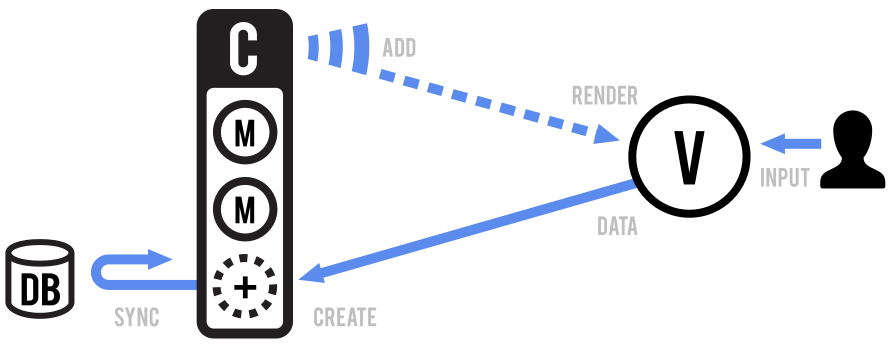
A Collection helps you deal with a group of related models, handling
the loading and saving of new models to the server and providing helper
functions for performing aggregations or computations against a list of models.
Aside from their own events, collections also proxy through all of the
events that occur to models within them, allowing you to listen in one place
for any change that might happen to any model in the collection.
API Integration
Ostov is pre-configured to sync with a RESTful API. Simply create a
new Collection with the url of your resource endpoint:
class Books extends Ostov.Collection {
  url = '/books';
}
The Collection and Model components together form a direct
mapping of REST resources using the following methods:
GET  /books/ .... collection.fetch();
POST /books/ .... collection.create();
GET  /books/1 ... model.fetch();
PUT  /books/1 ... model.save();
DEL  /books/1 ... model.destroy();
When fetching raw JSON data from an API, a Collection will
automatically populate itself with data formatted as an array, while
a Model will automatically populate itself with data formatted
as an object:
[{"id": 1}] ..... populates a Collection with one model.
{"id": 1} ....... populates a Model with one attribute.
However, it's fairly common to encounter APIs that return data in a
different format than what Ostov expects. For example, consider
fetching a Collection from an API that returns the real data
array wrapped in metadata:
{
  "page": 1,
  "limit": 10,
  "total": 2,
  "books": [
    {"id": 1, "title": "Pride and Prejudice"},
    {"id": 4, "title": "The Great Gatsby"}
  ]
}
In the above example data, a Collection should populate using the
"books" array rather than the root object structure. This
difference is easily reconciled using a parse method that
returns (or transforms) the desired portion of API data:
class Books extends Ostov.Collection {
  url = '/books';
  parse(data) {
    return data.books;
  }
}
View Rendering
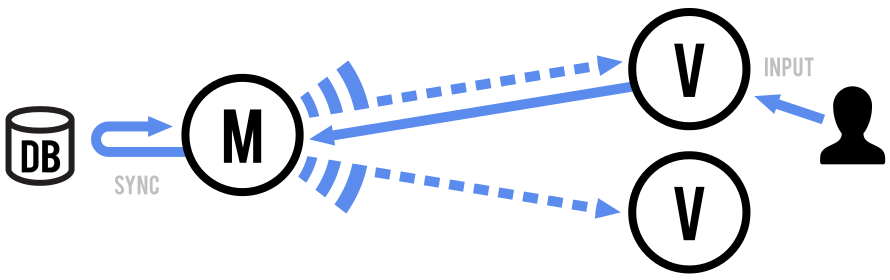
Each View manages the rendering and user interaction within its own
DOM element. If you're strict about not allowing views to reach outside
of themselves, it helps keep your interface flexible — allowing
views to be rendered in isolation in any place where they might be needed.
Ostov remains unopinionated about the process used to render View
objects and their subviews into UI: you define how your models get translated
into HTML (or SVG, or Canvas, or something even more exotic).
It could be as prosaic as a simple
Underscore template, or as fancy as the
React virtual DOM.
Some basic approaches to rendering views can be found
in the Ostov primer.
Routing with URLs

In rich web applications, we still want to provide linkable,
bookmarkable, and shareable URLs to meaningful locations within an app.
Use the Router to update the browser URL whenever the user
reaches a new "place" in your app that they might want to bookmark or share.
Conversely, the Router detects changes to the URL — say,
pressing the "Back" button — and can tell your application exactly where you
are now.
Ostov.Events
Events is a module that can be mixed in to any object, giving the
object the ability to bind and trigger custom named events. Events do not
have to be declared before they are bound, and may take passed arguments.
For example:
var object = {};

_.extend(object, Ostov.Events);

object.on("alert", function(msg) {
  alert("Triggered " + msg);
});

object.trigger("alert", "an event");
For example, to make a handy event dispatcher that can coordinate events
among different areas of your application: var dispatcher = _.clone(Ostov.Events)
object.on(event, callback, [context])Alias: bind
Bind a callback function to an object. The callback will be invoked
whenever the event is fired.
If you have a large number of different events on a page, the convention is to use colons to
namespace them: "poll:start", or "change:selection".
The event string may also be a space-delimited list of several events...
book.on("change:title change:author", ...);
Callbacks bound to the special
"all" event will be triggered when any event occurs, and are passed
the name of the event as the first argument. For example, to proxy all events
from one object to another:
proxy.on("all", function(eventName) {
  object.trigger(eventName);
});
All Ostov event methods also support an event map syntax, as an alternative
to positional arguments:
book.on({
  "change:author": authorPane.update,
  "change:title change:subtitle": titleView.update,
  "destroy": bookView.remove
});
To supply a context value for this when the callback is invoked,
pass the optional last argument: model.on('change', this.render, this) or
model.on({change: this.render}, this).
object.off([event], [callback], [context])Alias: unbind
Remove a previously-bound callback function from an object. If no
context is specified, all of the versions of the callback with
different contexts will be removed. If no
callback is specified, all callbacks for the event will be
removed. If no event is specified, callbacks for all events
will be removed.
// Removes just the `onChange` callback.
object.off("change", onChange);

// Removes all "change" callbacks.
object.off("change");

// Removes the `onChange` callback for all events.
object.off(null, onChange);

// Removes all callbacks for `context` for all events.
object.off(null, null, context);

// Removes all callbacks on `object`.
object.off();
Note that calling model.off(), for example, will indeed remove all events
on the model — including events that Ostov uses for internal bookkeeping.
object.trigger(event, [*args])
Trigger callbacks for the given event, or space-delimited list of events.
Subsequent arguments to trigger will be passed along to the
event callbacks.
object.once(event, callback, [context])
Just like on, but causes the bound callback to fire
only once before being removed. Handy for saying "the next time that X happens, do this".
When multiple events are passed in using the space separated syntax, the event will fire once
for every event you passed in, not once for a combination of all events
object.listenTo(other, event, callback)
Tell an object to listen to a particular event on an other
object. The advantage of using this form, instead of other.on(event,
callback, object), is that listenTo allows the object
to keep track of the events, and they can be removed all at once later
on. The callback will always be called with object as
context.
view.listenTo(model, 'change', view.render);
object.stopListening([other], [event], [callback])
Tell an object to stop listening to events. Either call
stopListening with no arguments to have the object remove
all of its registered callbacks ... or be more
precise by telling it to remove just the events it's listening to on a
specific object, or a specific event, or just a specific callback.
view.stopListening();

view.stopListening(model);
object.listenToOnce(other, event, callback)
Just like listenTo, but causes the bound
callback to fire only once before being removed.
Here's the complete list of built-in Ostov events, with arguments.
You're also free to trigger your own events on Models, Collections and
Views as you see fit. The Ostov object itself mixes in Events,
and can be used to emit any global events that your application needs.
- "add" (model, collection, options) — when a model is added to a collection.
- "remove" (model, collection, options) — when a model is removed from a collection.
- "update" (collection, options) — single event triggered after any number of models have been added, removed or changed in a collection.
- "reset" (collection, options) — when the collection's entire contents have been reset.
- "sort" (collection, options) — when the collection has been re-sorted.
- "change" (model, options) — when a model's attributes have changed.
- "changeId" (model, previousId, options) — when the model's id has been updated.
- "change:[attribute]" (model, value, options) — when a specific attribute has been updated.
- "destroy" (model, collection, options) — when a model is destroyed.
- "request" (model_or_collection, xhr, options) — when a model or collection has started a request to the server.
- "sync" (model_or_collection, response, options) — when a model or collection has been successfully synced with the server.
- "error" (model_or_collection, xhr, options) — when a model's or collection's request to the server has failed.
- "invalid" (model, error, options) — when a model's validation fails on the client.
- "route:[name]" (params) — Fired by the router when a specific route is matched.
- "route" (route, params) — Fired by the router when any route has been matched.
- "route" (router, route, params) — Fired by history when any route has been matched.
- "notfound" () — Fired by history when no route could be matched.
- "all" — this special event fires for any triggered event, passing the event name as the first argument followed by all trigger arguments.
Generally speaking, when calling a function that emits an event
(model.set, collection.add, and so on...),
if you'd like to prevent the event from being triggered, you may pass
{silent: true} as an option. Note that this is rarely,
perhaps even never, a good idea. Passing through a specific flag
in the options for your event callback to look at, and choose to ignore,
will usually work out better.
Ostov.Model
Models are the heart of any JavaScript application, containing
the interactive data as well as a large part of the logic surrounding it:
conversions, validations, computed properties, and access control. You
extend Ostov.Model with your domain-specific methods, and
Model provides a basic set of functionality for managing changes.
The following is a contrived example, but it demonstrates defining a model
with a custom method, setting an attribute, and firing an event keyed
to changes in that specific attribute.
After running this code once, sidebar will be
available in your browser's console, so you can play around with it.
class Sidebar extends Ostov.Model {
  promptColor() {
    var cssColor = prompt("Please enter a CSS color:");
    this.set({color: cssColor});
  }
}

window.sidebar = new Sidebar;

sidebar.on('change:color', function(model, color) {
  $('#sidebar').css({background: color});
});

sidebar.set({color: 'white'});

sidebar.promptColor();
Ostov.Model.extend(properties, [classProperties])
extend is provided for backwards compatibility with older code. The preferred approach is to use native ES6 class syntax to subclass Ostov.Model:
class Note extends Ostov.Model {

  initialize() { ... }

  author() { ... }

  coordinates() { ... }

  allowedToEdit(account) {
    return true;
  }

}

class PrivateNote extends Note {

  allowedToEdit(account) {
    return account.owns(this);
  }

}
Brief aside on super: With ES6 classes, you can call super
directly. If you override a core function like set, or save,
you can invoke the parent object's implementation with:
class Note extends Ostov.Model {
  set(attributes, options) {
    super.set(attributes, options);
    ...
  }
}
new Model([attributes], [options])
For use with models as ES classes. If you define a preinitialize
method, it will be invoked when the Model is first created, before any
instantiation logic is run for the Model.
class Country extends Ostov.Model {
    preinitialize({countryCode}) {
      this.name = COUNTRY_NAMES[countryCode];
    }

    initialize() { ... }
}
new Model([attributes], [options])
When creating an instance of a model, you can pass in the initial values
of the attributes, which will be set on the
model. If you define an initialize function, it will be invoked when
the model is created.
new Book({
  title: "One Thousand and One Nights",
  author: "Scheherazade"
});
In rare cases, if you're looking to get fancy,
you may want to override constructor, which allows
you to replace the actual constructor function for your model.
class Library extends Ostov.Model {
  constructor(...args) {
    this.books = new Books();
    super(...args);
  }
  parse(data, options) {
    this.books.reset(data.books);
    return data.library;
  }
}
If you pass a {collection: ...} as the options, the model
gains a collection property that will be used to indicate which
collection the model belongs to, and is used to help compute the model's
url. The model.collection property is
normally created automatically when you first add a model to a collection.
Note that the reverse is not true, as passing this option to the constructor
will not automatically add the model to the collection. Useful, sometimes.
If {parse: true} is passed as an option, the attributes
will first be converted by parse before being
set on the model.
model.get(attribute)
Get the current value of an attribute from the model. For example:
note.get("title")
model.set(attributes, [options])
Set a hash of attributes (one or many) on the model. If any of the attributes
change the model's state, a "change" event will be triggered on the model.
Change events for specific attributes are also triggered, and you can bind
to those as well, for example: change:title, and change:content.
You may also pass individual keys and values.
note.set({title: "March 20", content: "In his eyes she eclipses..."});

book.set("title", "A Scandal in Bohemia");
model.escape(attribute)
Similar to get, but returns the HTML-escaped version
of a model's attribute. If you're interpolating data from the model into
HTML, using escape to retrieve attributes will prevent
XSS attacks.
var hacker = new Ostov.Model({
  name: "<script>alert('xss')</script>"
});

alert(hacker.escape('name'));
model.has(attribute)
Returns true if the attribute is set to a non-null or non-undefined
value.
if (note.has("title")) {
  ...
}
model.unset(attribute, [options])
Remove an attribute by deleting it from the internal attributes hash.
Fires a "change" event unless silent is passed as an option.
model.clear([options])
Removes all attributes from the model, including the id attribute. Fires a "change" event unless
silent is passed as an option.
model.id
A special property of models, the id is an arbitrary string
(integer id or UUID). If you set the id in the
attributes hash, it will be copied onto the model as a direct property.
model.id should not be manipulated directly,
it should be modified only via model.set('id', …).
Models can be retrieved by id from collections, and the id is used to generate
model URLs by default.
model.idAttribute
A model's unique identifier is stored under the id attribute.
If you're directly communicating with a backend (CouchDB, MongoDB) that uses
a different unique key, you may set a Model's idAttribute to
transparently map from that key to id.
If you set idAttribute, you may also want to
override cidPrefix.
class Meal extends Ostov.Model {
  idAttribute = "_id";
}

var cake = new Meal({ _id: 1, name: "Cake" });
alert("Cake id: " + cake.id);
model.cid
A special property of models, the cid or client id is a unique identifier
automatically assigned to all models when they're first created. Client ids
are handy when the model has not yet been saved to the server, and does not
yet have its eventual true id, but already needs to be visible in the UI.
model.cidPrefix
If your model has an id that is anything other than an
integer or a UUID, there is the possibility that it might collide with
its cid. To prevent this, you can override the prefix
that cids start with.
// If both lengths are 2, refresh the page before running this example.
var clashy = new Ostov.Collection([
  {id: 'c2'},
  {id: 'c1'},
]);
alert('clashy length: ' + clashy.length);

class ClashFree extends Ostov.Model {
  cidPrefix = 'm';
}
var clashless = new Ostov.Collection([
  {id: 'c3'},
  {id: 'c2'},
], {model: ClashFree});
alert('clashless length: ' + clashless.length);
model.attributes
The attributes property is the internal hash containing the model's
state — usually (but not necessarily) a form of the JSON object
representing the model data on the server. It's often a straightforward
serialization of a row from the database, but it could also be client-side
computed state.
Please use set to update the attributes
instead of modifying them directly. If you'd like to retrieve and munge a
copy of the model's attributes, use _.clone(model.attributes)
instead.
Due to the fact that Events accepts space separated
lists of events, attribute names should not include spaces.
model.changed
The changed property is the internal hash containing all the attributes
that have changed since its last set.
Please do not update changed directly since its state is internally maintained
by set. A copy of changed can be acquired from
changedAttributes.
model.defaults or model.defaults()
The defaults hash (or function) can be used to specify the default
attributes for your model. When creating an instance of the model,
any unspecified attributes will be set to their default value.
class Meal extends Ostov.Model {
  defaults = {
    "appetizer":  "caesar salad",
    "entree":     "ravioli",
    "dessert":    "cheesecake"
  };
}

alert("Dessert will be " + (new Meal).get('dessert'));
Remember that in JavaScript, objects are passed by reference, so if you
include an object as a default value, it will be shared among all instances.
Instead, define defaults as a function.
If you set a value for the model’s
idAttribute, you should define
the defaults as a function that returns a different, universally
unique id on every invocation. Not doing so would likely prevent an
instance of Ostov.Collection from correctly identifying model
hashes and is almost certainly a mistake, unless you never add instances
of the model class to a collection.
model.toJSON([options])
Return a shallow copy of the model's attributes
for JSON stringification. This can be used for persistence,
serialization, or for augmentation before being sent to the server. The
name of this method is a bit confusing, as it doesn't actually return a
JSON string — but I'm afraid that it's the way that the
JavaScript API for JSON.stringify
works.
var artist = new Ostov.Model({
  firstName: "Wassily",
  lastName: "Kandinsky"
});

artist.set({birthday: "December 16, 1866"});

alert(JSON.stringify(artist));
model.sync(method, model, [options])
Uses Ostov.sync to persist the state of a model to
the server. Can be overridden for custom behavior.
model.fetch([options])
Merges the model's state with attributes fetched from the server by
delegating to Ostov.sync. Returns a
jqXHR.
Useful if the model has never
been populated with data, or if you'd like to ensure that you have the
latest server state. Triggers a "change" event if the
server's state differs from the current attributes. fetch accepts
success and error callbacks in the options hash, which
are both passed (model, response, options) as arguments.
// Poll every 10 seconds to keep the channel model up-to-date.
setInterval(function() {
  channel.fetch();
}, 10000);
model.save([attributes], [options])
Save a model to your database (or alternative persistence layer),
by delegating to Ostov.sync. Returns a
jqXHR if
validation is successful and false otherwise. The attributes
hash (as in set) should contain the attributes
you'd like to change — keys that aren't mentioned won't be altered — but,
a complete representation of the resource will be sent to the server.
As with set, you may pass individual keys and values instead of a hash.
If the model has a validate
method, and validation fails, the model will not be saved. If the model
isNew, the save will be a "create"
(HTTP POST), if the model already
exists on the server, the save will be an "update" (HTTP PUT).
If instead, you'd only like the changed attributes to be sent to the
server, call model.save(attrs, {patch: true}). You'll get an HTTP
PATCH request to the server with just the passed-in attributes.
Calling save with new attributes will cause a "change"
event immediately, a "request" event as the Ajax request begins to
go to the server, and a "sync" event after the server has acknowledged
the successful change. Pass {wait: true} if you'd like to wait
for the server before setting the new attributes on the model.
In the following example, notice how our overridden version
of Ostov.sync receives a "create" request
the first time the model is saved and an "update"
request the second time.
Ostov.sync = function(method, model) {
  alert(method + ": " + JSON.stringify(model));
  model.set('id', 1);
};

var book = new Ostov.Model({
  title: "The Rough Riders",
  author: "Theodore Roosevelt"
});

book.save();

book.save({author: "Teddy"});
save accepts success and error callbacks in the
options hash, which will be passed the arguments (model, response, options).
If a server-side validation fails, return a non-200
HTTP response code, along with an error response in text or JSON.
book.save("author", "F.D.R.", {error: function(){ ... }});
model.destroy([options])
Destroys the model on the server by delegating an HTTP DELETE
request to Ostov.sync. Returns a
jqXHR object, or
false if the model isNew. Accepts
success and error callbacks in the options hash, which
will be passed (model, response, options).
Triggers a "destroy" event on the model, which will bubble up
through any collections that contain it, a "request" event as it
begins the Ajax request to the server, and a "sync" event, after
the server has successfully acknowledged the model's deletion. Pass
{wait: true} if you'd like to wait for the server to respond
before removing the model from the collection.
book.destroy({success: function(model, response) {
  ...
}});
Ostov provides 9 built-in object utility methods on Ostov.Model,
operating on the model's attributes.
user.pick('first_name', 'last_name', 'email');

chapters.keys().join(', ');
model.validate(attributes, options)
This method is left undefined and you're encouraged to override it with
any custom validation logic you have that can be performed in JavaScript.
If the attributes are valid, don't return anything from validate;
if they are invalid return an error of your choosing. It can be as
simple as a string error message to be displayed, or a complete error
object that describes the error programmatically.
By default save checks validate before
setting any attributes but you may also tell set to validate
the new attributes by passing {validate: true} as an option.
The validate method receives the model attributes as well as any
options passed to set or save, if validate
returns an error, save does not continue, the model attributes
are not modified on the server, an "invalid" event is triggered,
and the validationError property is set on the model with the
value returned by this method.
class Chapter extends Ostov.Model {
  validate(attrs, options) {
    if (attrs.end < attrs.start) {
      return "can't end before it starts";
    }
  }
}

var one = new Chapter({
  title : "Chapter One: The Beginning"
});

one.on("invalid", function(model, error) {
  alert(model.get("title") + " " + error);
});

one.save({
  start: 15,
  end:   10
});
"invalid" events are useful for providing coarse-grained error
messages at the model or collection level.
model.validationError
The value returned by validate during the last failed validation.
model.isValid(options)
Run validate to check the model state.
The validate method receives the model attributes as well as any
options passed to isValid, if validate returns an error
an "invalid" event is triggered, and the error is set on the
model in the validationError property.
class Chapter extends Ostov.Model {
  validate(attrs, options) {
    if (attrs.end < attrs.start) {
      return "can't end before it starts";
    }
  }
}

var one = new Chapter({
  title : "Chapter One: The Beginning"
});

one.set({
  start: 15,
  end:   10
});

if (!one.isValid()) {
  alert(one.get("title") + " " + one.validationError);
}
model.url()
Returns the relative URL where the model's resource would be located on
the server. If your models are located somewhere else, override this method
with the correct logic. Generates URLs of the form: "[collection.url]/[id]"
by default, but you may override by specifying an explicit urlRoot
if the model's collection shouldn't be taken into account.
Delegates to Collection#url to generate the
URL, so make sure that you have it defined, or a urlRoot
property, if all models of this class share a common root URL.
A model with an id of 101, stored in a
Ostov.Collection with a url of "/documents/7/notes",
would have this URL: "/documents/7/notes/101"
model.urlRoot or model.urlRoot()
Specify a urlRoot if you're using a model outside of a collection,
to enable the default url function to generate
URLs based on the model id. "[urlRoot]/id"
Normally, you won't need to define this.
Note that urlRoot may also be a function.
class Book extends Ostov.Model {
  urlRoot = '/books';
}

var solaris = new Book({id: "1083-lem-solaris"});

alert(solaris.url());
model.parse(response, options)
parse is called whenever a model's data is returned by the
server, in fetch, and save.
The function is passed the raw response object, and should return
the attributes hash to be set on the model. The
default implementation is a no-op, simply passing through the JSON response.
Override this if you need to work with a preexisting API, or better namespace
your responses.
If you're working with a Rails backend that has a version prior to 3.1,
you'll notice that its default to_json implementation includes
a model's attributes under a namespace. To disable this behavior for
seamless Ostov integration, set:
ActiveRecord::Base.include_root_in_json = false
model.clone()
Returns a new instance of the model with identical attributes.
model.isNew()
Has this model been saved to the server yet? If the model does not yet have
an id, it is considered to be new.
model.hasChanged([attribute])
Has the model changed since its last set? If an attribute
is passed, returns true if that specific attribute has changed.
Note that this method, and the following change-related ones,
are only useful during the course of a "change" event.
book.on("change", function() {
  if (book.hasChanged("title")) {
    ...
  }
});
model.changedAttributes([attributes])
Retrieve a hash of only the model's attributes that have changed since the last
set, or false if there are none. Optionally, an external
attributes hash can be passed in, returning the attributes in that
hash which differ from the model. This can be used to figure out which
portions of a view should be updated, or what calls
need to be made to sync the changes to the server.
model.previous(attribute)
During a "change" event, this method can be used to get the
previous value of a changed attribute.
var bill = new Ostov.Model({
  name: "Bill Smith"
});

bill.on("change:name", function(model, name) {
  alert("Changed name from " + bill.previous("name") + " to " + name);
});

bill.set({name : "Bill Jones"});
model.previousAttributes()
Return a copy of the model's previous attributes. Useful for getting a
diff between versions of a model, or getting back to a valid state after
an error occurs.
Ostov.Collection
Collections are ordered sets of models. You can bind "change" events
to be notified when any model in the collection has been modified,
listen for "add" and "remove" events, fetch
the collection from the server, and use a full suite of
Underscore.js methods.
Any event that is triggered on a model in a collection will also be
triggered on the collection directly, for convenience.
This allows you to listen for changes to specific attributes in any
model in a collection, for example:
documents.on("change:selected", ...)
Ostov.Collection.extend(properties, [classProperties])
To create a Collection class of your own, extend Ostov.Collection,
providing instance properties, as well as optional classProperties to be attached
directly to the collection's constructor function.
collection.model([attrs], [options])
Override this property to specify the model class that the collection contains.
If defined, you can pass raw attributes objects (and arrays) and options to
add, create,
and reset, and the attributes will be
converted into a model of the proper type using the provided options, if any.
class Library extends Ostov.Collection {
  model = Book;
}
A collection can also contain polymorphic models by overriding this property
with a constructor that returns a model.
class Library extends Ostov.Collection {

  model(attrs, options) {
    if (condition) {
      return new PublicDocument(attrs, options);
    } else {
      return new PrivateDocument(attrs, options);
    }
  }

}
collection.modelId(attrs, idAttribute)
Override this method to return the value the collection will use to
identify a model given its attributes. Useful for combining models from
multiple tables with different idAttribute
values into a single collection.
By default returns the value of the given
idAttribute
within the attrs, or failing that, id. If
your collection uses a model factory and
the id ranges of those models might collide, you must
override this method.
class Library extends Ostov.Collection {
  modelId(attrs) {
    return attrs.type + attrs.id;
  }
}

var library = new Library([
  {type: 'dvd', id: 1},
  {type: 'vhs', id: 1}
]);

var dvdId = library.get('dvd1').id;
var vhsId = library.get('vhs1').id;
alert('dvd: ' + dvdId + ', vhs: ' + vhsId);
new Ostov.Collection([models], [options])
For use with collections as ES classes. If you define a preinitialize
method, it will be invoked when the Collection is first created and before
any instantiation logic is run for the Collection.
class Library extends Ostov.Collection {
  preinitialize() {
    this.on("add", function() {
      console.log("Add model event got fired!");
    });
  }
}
new Ostov.Collection([models], [options])
When creating a Collection, you may choose to pass in the initial array
of models. The collection's comparator
may be included as an option. Passing false as the
comparator option will prevent sorting. If you define an
initialize function, it will be invoked when the collection is
created. There are a couple of options that, if provided, are attached to
the collection directly: model and comparator.
Pass null for models to create an empty Collection with options.
var tabs = new TabSet([tab1, tab2, tab3]);
var spaces = new Ostov.Collection(null, {
  model: Space
});
If {parse: true} is passed as an option, the attributes
will first be converted by parse before being
set on the collection.
collection.models
Raw access to the JavaScript array of models inside of the collection. Usually you'll
want to use get, at, or the Underscore methods
to access model objects, but occasionally a direct reference to the array
is desired.
collection.toJSON([options])
Return an array containing the attributes hash of each model
(via toJSON) in the
collection. This can be used to serialize and persist the
collection as a whole. The name of this method is a bit confusing, because
it conforms to
JavaScript's JSON API.
var collection = new Ostov.Collection([
  {name: "Tim", age: 5},
  {name: "Ida", age: 26},
  {name: "Rob", age: 55}
]);

alert(JSON.stringify(collection));
collection.sync(method, collection, [options])
Uses Ostov.sync to persist the state of a
collection to the server. Can be overridden for custom behavior.
Ostov provides 46 built-in iteration functions on Ostov.Collection,
operating over collection.models.
Most methods can take an object or string to support model-attribute-style
predicates or a function that receives the model instance as an argument.
books.each(function(book) {
  book.publish();
});

var titles = books.map("title");

var publishedBooks = books.filter({published: true});

var alphabetical = books.sortBy(function(book) {
  return book.author.get("name").toLowerCase();
});

var randomThree = books.sample(3);
collection.add(models, [options])
Add a model (or an array of models) to the collection, firing
an "add" event for each model, and an "update"
event afterwards. This is a variant
of set with the same options and
return value, but it always adds and never removes. If you're
adding models to the collection that are already in the
collection, they'll be ignored, unless you pass {merge:
true}, in which case their attributes will be merged into
the corresponding models, firing any
appropriate "change" events.
var ships = new Ostov.Collection;

ships.on("add", function(ship) {
  alert("Ahoy " + ship.get("name") + "!");
});

ships.add([
  {name: "Flying Dutchman"},
  {name: "Black Pearl"}
]);
Note that adding the same model (a model with the same id) to
a collection more than once
is a no-op.
collection.remove(models, [options])
Remove a model (or an array of models) from the collection, and return
them. Each model can be a Model instance, an id string or a JS
object, any value acceptable as the id argument of
collection.get.
Fires a "remove" event for each model, and a single
"update" event afterwards, unless {silent: true} is passed.
The model's index before removal is available to listeners as
options.index.
collection.reset([models], [options])
Adding and removing models one at a time is all well and good, but sometimes
you have so many models to change that you'd rather just update the collection
in bulk. Use reset to replace a collection with a new list
of models (or attribute hashes), triggering a single "reset" event
on completion, and without triggering any add or remove events on any models.
Returns the newly-set models.
For convenience, within a "reset" event, the list of any
previous models is available as options.previousModels.
Pass null for models to empty your Collection with options.
Here's an example using reset to bootstrap a collection during initial page load,
in a Rails application:
<script>
  var accounts = new Ostov.Collection;
  accounts.reset(<%= @accounts.to_json %>);
</script>
Calling collection.reset() without passing any models as arguments
will empty the entire collection.
collection.set(models, [options])
The set method performs a "smart" update of the
collection with the passed list of models. If a model in the
list isn't yet in the collection it will be added; if the model
is already in the collection its attributes will be merged; and
if the collection contains any models that
aren't present in the list, they'll be removed. All of
the appropriate
"add", "remove", and "change" events
are fired as this happens, with a single "update" event
at the end. Returns the touched models in the collection. If
you'd like to customize this behavior, you can change it with
options: {add: false}, {remove: false},
or {merge: false}.
If a model property is defined,
you may also pass raw attributes objects and options, and have
them be vivified as instances of the model using the provided
options. If you set
a comparator, the
collection will automatically sort itself and trigger
a "sort" event, unless you pass {sort: false}
or use the {at: index} option. Pass {at: index}
to splice the model(s) into the collection at the
specified index.
var vanHalen = new Ostov.Collection([eddie, alex, stone, roth]);

vanHalen.set([eddie, alex, stone, hagar]);

// Fires a "remove" event for roth, and an "add" event for "hagar".
// Updates any of stone, alex, and eddie's attributes that may have
// changed over the years.
collection.get(id)
Get a model from a collection, specified by an id,
a cid, or by passing in a model.
var book = library.get(110);
collection.at(index)
Get a model from a collection, specified by index. Useful if your collection
is sorted, and if your collection isn't sorted, at will still
retrieve models in insertion order. When passed a negative index, it
will retrieve the model from the back of the collection.
collection.push(model, [options])
Like add, but always adds a model
at the end of the collection and never sorts.
collection.pop([options])
Remove and return the last model from a collection. Takes the same options as
remove.
collection.unshift(model, [options])
Like add, but always adds a model
at the beginning of the collection and never sorts.
collection.shift([options])
Remove and return the first model from a collection. Takes the same options as
remove.
collection.slice(begin, end)
Return a shallow copy of this collection's models, using the same options as
native
Array#slice.
collection.length
Like an array, a Collection maintains a length property, counting
the number of models it contains.
collection.comparator
By default there is no comparator for a collection.
If you define a comparator, it will be used to sort the collection any
time a model is added.
A comparator can be defined as a
sortBy
(pass a function that takes a single argument),
as a
sort
(pass a comparator function that expects two arguments),
or as a string indicating the attribute to sort by.
"sortBy" comparator functions take a model and return a numeric or string
value by which the model should be ordered relative to others.
"sort" comparator functions take two models, and return -1 if
the first model should come before the second, 0 if they are of
the same rank and 1 if the first model should come after.
Note that Ostov depends on the arity of your comparator function to
determine between the two styles, so be careful if your comparator function
is bound.
Note how even though all of the chapters in this example are added backwards,
they come out in the proper order:
var Chapter  = Ostov.Model;
var chapters = new Ostov.Collection;

chapters.comparator = 'page';

chapters.add(new Chapter({page: 9, title: "The End"}));
chapters.add(new Chapter({page: 5, title: "The Middle"}));
chapters.add(new Chapter({page: 1, title: "The Beginning"}));

alert(chapters.pluck('title'));
Collections with a comparator will not automatically re-sort if you
later change model attributes, so you may wish to call
sort after changing model attributes that would affect the order.
collection.sort([options])
Force a collection to re-sort itself. Note that a collection with a
comparator will sort itself
automatically whenever a model is added. To disable sorting when adding
a model, pass {sort: false} to add. Calling sort
triggers a "sort" event on the collection.
collection.pluck(attribute)
Pluck an attribute from each model in the collection. Equivalent to calling
map and returning a single attribute from the iterator.
var stooges = new Ostov.Collection([
  {name: "Curly"},
  {name: "Larry"},
  {name: "Moe"}
]);

var names = stooges.pluck("name");

alert(JSON.stringify(names));
collection.where(attributes)
Return an array of all the models in a collection that match the
passed attributes. Useful for simple cases of filter.
var friends = new Ostov.Collection([
  {name: "Athos",      job: "Musketeer"},
  {name: "Porthos",    job: "Musketeer"},
  {name: "Aramis",     job: "Musketeer"},
  {name: "d'Artagnan", job: "Guard"},
]);

var musketeers = friends.where({job: "Musketeer"});

alert(musketeers.length);
collection.findWhere(attributes)
Just like where, but directly returns only
the first model in the collection that matches the passed attributes.
If no model matches returns undefined.
collection.url or collection.url()
Set the url property (or function) on a collection to reference
its location on the server. Models within the collection will use url
to construct URLs of their own.
class Notes extends Ostov.Collection {
  url = '/notes';
}

// Or, something more sophisticated:

class Notes extends Ostov.Collection {
  url() {
    return this.document.url() + '/notes';
  }
}
collection.parse(response, options)
parse is called by Ostov whenever a collection's models are
returned by the server, in fetch.
The function is passed the raw response object, and should return
the array of model attributes to be added
to the collection. The default implementation is a no-op, simply passing
through the JSON response. Override this if you need to work with a
preexisting API, or better namespace your responses.
class Tweets extends Ostov.Collection {
  // The Twitter Search API returns tweets under "results".
  parse(response) {
    return response.results;
  }
}
collection.clone()
Returns a new instance of the collection with an identical list of models.
collection.fetch([options])
Fetch the default set of models for this collection from the server,
setting them on the collection when they arrive.
The options hash takes success and error callbacks
which will both be passed (collection, response, options) as arguments.
When the model data returns from the server, it uses set
to (intelligently) merge the fetched models, unless you pass {reset: true},
in which case the collection will be (efficiently) reset.
Delegates to Ostov.sync
under the covers for custom persistence strategies and returns a
jqXHR.
The server handler for fetch requests should return a JSON array of
models.
Ostov.sync = function(method, model) {
  alert(method + ": " + model.url);
};

var accounts = new Ostov.Collection;
accounts.url = '/accounts';

accounts.fetch();
The behavior of fetch can be customized by using the available
set options. For example, to fetch a
collection, getting an "add" event for every new model, and
a "change" event for every changed existing model, without
removing anything: collection.fetch({remove: false})
jQuery.ajax options can also be passed directly as fetch options,
so to fetch a specific page of a paginated collection:
Documents.fetch({data: {page: 3}})
Note that fetch should not be used to populate collections on
page load — all models needed at load time should already be
bootstrapped in to place. fetch is
intended for lazily-loading models for interfaces that are not needed
immediately: for example, documents with collections of notes that may be
toggled open and closed.
collection.create(attributes, [options])
Convenience to create a new instance of a model within a collection.
Equivalent to instantiating a model with a hash of attributes,
saving the model to the server, and adding the model to the set after being
successfully created. Returns the new model. If client-side validation
failed, the model will be unsaved, with validation errors.
In order for this to work, you should set the
model property of the collection.
The create method can accept either an attributes hash and options to be
passed down during model instantiation or an existing, unsaved model object.
Creating a model will cause an immediate "add" event to be
triggered on the collection, a "request" event as the new model is
sent to the server, as well as a "sync" event, once the
server has responded with the successful creation of the model. Pass {wait: true}
if you'd like to wait for the server before adding the new model to the collection.
class Library extends Ostov.Collection {
  model = Book;
}

var nypl = new Library;

var othello = nypl.create({
  title: "Othello",
  author: "William Shakespeare"
});
Ostov.Collection.mixin(properties)
mixin provides a way to enhance the base Ostov.Collection
and any collections which extend it. This can be used to add generic methods
(e.g. additional Underscore Methods).
Ostov.Collection.mixin({
  sum: function(models, iteratee) {
    return _.reduce(models, function(s, m) {
      return s + iteratee(m);
    }, 0);
  }
});

var cart = new Ostov.Collection([
  {price: 16, name: 'monopoly'},
  {price: 5, name: 'deck of cards'},
  {price: 20, name: 'chess'}
]);

var cost = cart.sum('price');
Ostov.Router
Web applications often provide linkable, bookmarkable, shareable URLs for
important locations in the app. Until recently, hash fragments
(#page) were used to provide these permalinks, but with the
arrival of the History API, it's now possible to use standard URLs (/page).
Ostov.Router provides methods for routing client-side pages, and
connecting them to actions and events. For browsers which don't yet support
the History API, the Router handles graceful fallback and transparent
translation to the fragment version of the URL.
During page load, after your application has finished creating all of its routers,
be sure to call Ostov.history.start() or
Ostov.history.start({pushState: true}) to route the initial URL.
Ostov.Router.extend(properties, [classProperties])
Get started by creating a custom router class. Define action functions that are
triggered when certain URL fragments are
matched, and provide a routes hash
that pairs routes to actions. Note that you'll want to avoid using a
leading slash in your route definitions:
class Workspace extends Ostov.Router {

  routes = {
    "help":                 "help",    // #help
    "search/:query":        "search",  // #search/kiwis
    "search/:query/p:page": "search"   // #search/kiwis/p7
  };

  help() {
    ...
  }

  search(query, page) {
    ...
  }

}
router.routes
The routes hash maps URLs with parameters to functions on your router
(or just direct function definitions, if you prefer),
similar to the View's events hash.
Routes can contain parameter parts, :param, which match a single URL
component between slashes; and splat parts *splat, which can match
any number of URL components. Part of a route can be made optional by
surrounding it in parentheses (/:optional).
For example, a route of "search/:query/p:page" will match
a fragment of #search/obama/p2, passing "obama"
and "2" to the action as positional arguments.
A route of "file/*path" will match
#file/folder/file.txt, passing
"folder/file.txt" to the action.
A route of "docs/:section(/:subsection)" will match
#docs/faq and #docs/faq/installing, passing
"faq" to the action in the first case, and passing "faq"
and "installing" to the action in the second.
A nested optional route of "docs(/:section)(/:subsection)" will match
#docs, #docs/faq, and #docs/faq/installing,
passing "faq" to the action in the second case, and passing "faq"
and "installing" to the action in the third.
Trailing slashes are treated as part of the URL, and (correctly) treated
as a unique route when accessed. docs and docs/ will fire
different callbacks. If you can't avoid generating both types of URLs, you
can define a "docs(/)" matcher to capture both cases.
When the visitor presses the back button, or enters a URL, and a particular
route is matched, the name of the action will be fired as an
event, so that other objects can listen to the router,
and be notified. In the following example, visiting #help/uploading
will fire a route:help event from the router.
routes: {
  "help/:page":         "help",
  "download/*path":     "download",
  "folder/:name":       "openFolder",
  "folder/:name-:mode": "openFolder"
}
router.on("route:help", function(page) {
  ...
});
new Ostov.Router([options])
For use with routers as ES classes. If you define a preinitialize
method, it will be invoked when the Router is first created and before
any instantiation logic is run for the Router.
class Router extends Ostov.Router {
  preinitialize() {
    // Override execute method
    this.execute = function(callback, args, name) {
      if (!loggedIn) {
        goToLogin();
        return false;
      }
      args.push(parseQueryString(args.pop()));
      if (callback) callback.apply(this, args);
    }
  }
}
new Router([options])
When creating a new router, you may pass its
routes hash directly as an option, if you
choose. All options will also be passed to your initialize
function, if defined.
router.route(route, name, [callback])
Manually create a route for the router, The route argument may
be a routing string or regular expression.
Each matching capture from the route or regular expression will be passed as
an argument to the callback. The name argument will be triggered as
a "route:name" event whenever the route is matched. If the
callback argument is omitted router[name] will be used
instead. Routes added later may override previously declared routes.
initialize: function(options) {

  // Matches #page/10, passing "10"
  this.route("page/:number", "page", function(number){ ... });

  // Matches /117-a/b/c/open, passing "117-a/b/c" to this.open
  this.route(/^(.*?)\/open$/, "open");

},

open: function(id) { ... }
router.navigate(fragment, [options])
Whenever you reach a point in your application that you'd like to save
as a URL, call navigate in order to update the URL.
If you also wish to call the route function, set the trigger
option to true.
To update the URL without creating an entry in the browser's history,
set the replace option to true.
openPage: function(pageNumber) {
  this.document.pages.at(pageNumber).open();
  this.navigate("page/" + pageNumber);
}

# Or ...

app.navigate("help/troubleshooting", {trigger: true});

# Or ...

app.navigate("help/troubleshooting", {trigger: true, replace: true});
router.execute(callback, args, name)
This method is called internally within the router, whenever a route
matches and its corresponding callback is about to be executed.
Return false from execute to cancel the current transition.
Override it to perform custom parsing or wrapping of your routes, for
example, to parse query strings before handing them to your route
callback, like so:
class Router extends Ostov.Router {
  execute(callback, args, name) {
    if (!loggedIn) {
      goToLogin();
      return false;
    }
    args.push(parseQueryString(args.pop()));
    if (callback) callback.apply(this, args);
  }
}
Ostov.history
History serves as a global router (per frame) to handle hashchange
events or pushState, match the appropriate route, and trigger callbacks.
It forwards the "route" and "route[name]" events of the
matching router, or "notfound" when no route in any router
matches the current URL.
You shouldn't ever have to create one of these yourself since Ostov.history
already contains one.
pushState support exists on a purely opt-in basis in Ostov.
Older browsers that don't support pushState will continue to use
hash-based URL fragments, and if a hash URL is visited by a
pushState-capable browser, it will be transparently upgraded to
the true URL. Note that using real URLs requires your web server to be
able to correctly render those pages, so back-end changes are required
as well. For example, if you have a route of /documents/100,
your web server must be able to serve that page, if the browser
visits that URL directly. For full search-engine crawlability, it's best to
have the server generate the complete HTML for the page ... but if it's a web
application, just rendering the same content you would have for the root URL,
and filling in the rest with Ostov Views and JavaScript works fine.
Ostov.history.start([options])
When all of your Routers have been created,
and all of the routes are set up properly, call Ostov.history.start()
to begin monitoring hashchange events, and dispatching routes.
Subsequent calls to Ostov.history.start() will throw an error,
and Ostov.History.started is a boolean value indicating whether
it has already been called.
To indicate that you'd like to use HTML5 pushState support in
your application, use Ostov.history.start({pushState: true}).
If you'd like to use pushState, but have browsers that don't support
it natively use full page refreshes instead, you can add
{hashChange: false} to the options.
If your application is not being served from the root url / of your
domain, be sure to tell History where the root really is, as an option:
Ostov.history.start({pushState: true, root: "/public/search/"}).
The value provided for root will be normalized to include a leading
and trailing slash. When navigating to a route the default behavior is to
exclude the trailing slash from the URL (e.g., /public/search?query=...).
If you prefer to include the trailing slash (e.g., /public/search/?query=...)
use Ostov.history.start({trailingSlash: true}).
URLs will always contain a leading slash. When root is / URLs will
look like /?query=... regardless of the value of trailingSlash.
When called, if a route succeeds with a match for the current URL,
Ostov.history.start() returns true and
the "route" and "route[name]" events are triggered. If
no defined route matches the current URL, it returns false
and "notfound" is triggered instead.
If the server has already rendered the entire page, and you don't want the
initial route to trigger when starting History, pass silent: true.
Because hash-based history in Internet Explorer relies on an
<iframe>, be sure to call start() only after the DOM
is ready.
$(function(){
  new WorkspaceRouter();
  new HelpPaneRouter();
  Ostov.history.start({pushState: true});
});
Ostov.sync
Ostov.sync is the function that Ostov calls every time it
attempts to read or save a model to the server. By default, it uses
jQuery.ajax to make a RESTful JSON request and returns a
jqXHR. You can override
it in order to use a different persistence strategy, such as WebSockets,
XML transport, or Local Storage.
The method signature of Ostov.sync is sync(method, model, [options])
- method – the CRUD method ("create", "read", "update", or "delete")
- model – the model to be saved (or collection to be read)
- options – success and error callbacks, and all other jQuery request options
With the default implementation, when Ostov.sync sends up a request to save
a model, its attributes will be passed, serialized as JSON, and sent in the HTTP body
with content-type application/json. When returning a JSON response,
send down the attributes of the model that have been changed by the server, and need
to be updated on the client. When responding to a "read" request from a collection
(Collection#fetch), send down an array
of model attribute objects.
Whenever a model or collection begins a sync with the server, a
"request" event is emitted. If the request completes successfully
you'll get a "sync" event, and an "error" event if not.
The sync function may be overridden globally as Ostov.sync,
or at a finer-grained level, by adding a sync function to a Ostov
collection or to an individual model.
The default sync handler maps CRUD to REST like so:
- create → POST /collection
- read → GET /collection[/id]
- update → PUT /collection/id
- patch → PATCH /collection/id
- delete → DELETE /collection/id
As an example, a Rails 4 handler responding to an "update" call from
Ostov might look like this:
def update
  account = Account.find params[:id]
  permitted = params.require(:account).permit(:name, :otherparam)
  account.update_attributes permitted
  render :json => account
end
One more tip for integrating Rails versions prior to 3.1 is to disable
the default namespacing for to_json calls on models by setting
ActiveRecord::Base.include_root_in_json = false
Ostov.ajax = function(request) { ... };
If you want to use a custom AJAX function, or your endpoint doesn't support
the jQuery.ajax API
and you need to tweak things, you can do so by setting Ostov.ajax.
Ostov.emulateHTTP = true
If you want to work with a legacy web server that doesn't support Ostov's
default REST/HTTP approach, you may choose to turn on Ostov.emulateHTTP.
Setting this option will fake PUT, PATCH and DELETE requests with
a HTTP POST, setting the X-HTTP-Method-Override header
with the true method. If emulateJSON is also on, the true method
will be passed as an additional _method parameter.
Ostov.emulateHTTP = true;

model.save();  // POST to "/collection/id", with "_method=PUT" + header.
Ostov.emulateJSON = true
If you're working with a legacy web server that can't handle requests
encoded as application/json, setting Ostov.emulateJSON = true;
will cause the JSON to be serialized under a model parameter, and
the request to be made with a application/x-www-form-urlencoded
MIME type, as if from an HTML form.
Ostov.View
Ostov views are almost more convention than they are code — they
don't determine anything about your HTML or CSS for you, and can be used
with any JavaScript templating library.
The general idea is to organize your interface into logical views,
backed by models, each of which can be updated independently when the
model changes, without having to redraw the page. Instead of digging into
a JSON object, looking up an element in the DOM, and updating the HTML by hand,
you can bind your view's render function to the model's "change"
event — and now everywhere that
model data is displayed in the UI, it is always immediately up to date.
Ostov.View.extend(properties, [classProperties])
Get started with views by creating a custom view class. You'll want to
override the render function, specify your
declarative events, and perhaps the
tagName, className, or id of the View's root
element.
In TypeScript, View accepts a type parameter TEl that controls
the type of this.$el. It defaults to Element, which gives you
full DOM API access without a cast. Pass a jQuery type when using
Ostov.$ = $:
// default — $el is Element
class AppView extends Ostov.View {
  render() {
    this.$el.innerHTML = template(data); // ✓
  }
}

// with jQuery — $el is JQuery
class AppView extends Ostov.View<JQuery> {
  render() {
    this.$el.find(".item").remove(); // ✓
  }
}
class DocumentRow extends Ostov.View {

  tagName = "li";

  className = "document-row";

  events = {
    "click .icon":          "open",
    "click .button.edit":   "openEditDialog",
    "click .button.delete": "destroy"
  };

  initialize() {
    this.listenTo(this.model, "change", this.render);
  }

  render() {
    ...
  }

}
Properties like tagName, id, className,
el, and events may also be defined as a function, if
you want to wait to define them until runtime.
new View([options])
For use with views as ES classes. If you define a preinitialize
method, it will be invoked when the view is first created, before any
instantiation logic is run.
class Document extends Ostov.View {
  preinitialize({autoRender}) {
    this.autoRender = autoRender;
  }

  initialize() {
    if (this.autoRender) {
      this.listenTo(this.model, "change", this.render);
    }
  }
}
new View([options])
There are several special
options that, if passed, will be attached directly to the view:
model, collection,
el, id, className, tagName, attributes and events.
If the view defines an initialize function, it will be called when
the view is first created. If you'd like to create a view that references
an element already in the DOM, pass in the element as an option:
new View({el: existingElement})
var doc = documents.first();

new DocumentRow({
  model: doc,
  id: "document-row-" + doc.id
});
view.el
All views have a DOM element at all times (the el property),
whether they've already been inserted into the page or not. In this
fashion, views can be rendered at any time, and inserted into the DOM all
at once, in order to get high-performance UI rendering with as few
reflows and repaints as possible.
this.el can be resolved from a DOM selector string or an Element;
otherwise it will be created from the view's tagName, className,
id and attributes properties.
If none are set, this.el is an empty div, which is often just
fine. An el reference may also be passed in to the view's constructor.
class ItemView extends Ostov.View {
  tagName = 'li';
}

class BodyView extends Ostov.View {
  el = 'body';
}

var item = new ItemView();
var body = new BodyView();

alert(item.el + ' ' + body.el);
view.$el
A cached reference to the view's root element, set alongside this.el
whenever setElement is called.
Without jQuery, $el is the same raw DOM Element as this.el.
When Ostov.$ is set to jQuery (or a compatible library), $el
becomes a wrapped object — a handy shortcut instead of re-wrapping
the element every time.
// without jQuery
view.$el.innerHTML = template(data);

// with jQuery (Ostov.$ = $)
view.$el.show();
listView.$el.append(itemView.el);
view.setElement(element)
If you'd like to apply a Ostov view to a different DOM element, use
setElement, which will also create the cached $el reference
and move the view's delegated events from the old element to the new one.
view.attributes
A hash of attributes that will be set as HTML DOM element attributes on the
view's el (id, class, data-properties, etc.), or a function that
returns such a hash.
view.$(selector)
If jQuery is included on the page, each view has a
$ function that runs queries scoped within the view's element. If you use this
scoped jQuery function, you don't have to use model ids as part of your query
to pull out specific elements in a list, and can rely much more on HTML class
attributes. It's equivalent to running: view.$el.find(selector)
ui.Chapter = class extends Ostov.View {
  serialize() {
    return {
      title: this.$(".title").text(),
      start: this.$(".start-page").text(),
      end:   this.$(".end-page").text()
    };
  }
};
view.template([data])
While templating for a view isn't a function provided directly by Ostov,
it's often a nice convention to define a template function on your
views. In this way, when rendering your view, you have convenient access to
instance data.
For example, using Underscore templates:
class LibraryView extends Ostov.View {
  template = _.template(...);
}
view.render()
The default implementation of render is a no-op. Override this
function with your code that renders the view template from model data,
and updates this.el with the new HTML. A good
convention is to return this at the end of render to
enable chained calls.
class Bookmark extends Ostov.View {
  template = _.template(...);
  render() {
    this.$el.html(this.template(this.model.attributes));
    return this;
  }
}
Ostov is agnostic with respect to your preferred method of HTML templating.
Your render function could even munge together an HTML string, or use
document.createElement to generate a DOM tree. However, we suggest
choosing a nice JavaScript templating library.
Mustache.js,
Haml-js, and
Eco are all fine alternatives.
Underscore templates
are an excellent choice if you prefer simple interpolated-JavaScript style templates.
Whatever templating strategy you end up with, it's nice if you never
have to put strings of HTML in your JavaScript. Modern bundlers like
Vite or webpack
can handle importing template files from /src/templates as part of your build.
view.remove()
Removes a view and its el from the DOM, and calls
stopListening to remove any bound
events that the view has listenTo'd.
view.events or view.events()
The events hash (or method) can be used to specify a set of DOM
events that will be bound to methods on your View
through delegateEvents.
Ostov will automatically attach the event listeners at instantiation
time, right before invoking initialize.
var ENTER_KEY = 13;
class InputView extends Ostov.View {

  tagName = 'input';

  events = {
    "keydown" : "keyAction",
  };

  render() { ... }

  keyAction(e) {
    if (e.which === ENTER_KEY) {
      this.collection.add({text: this.$el.val()});
    }
  }
}
delegateEvents([events])
Uses jQuery's on function to provide declarative callbacks
for DOM events within a view.
If an events hash is not passed directly, uses this.events
as the source. Events are written in the format {"event selector": "callback"}.
The callback may be either the name of a method on the view, or a direct
function body.
Omitting the selector causes the event to be bound to the view's
root element (this.el). By default, delegateEvents is called
within the View's constructor for you, so if you have a simple events
hash, all of your DOM events will always already be connected, and you will
never have to call this function yourself.
The events property may also be defined as a function that returns
an events hash, to make it easier to programmatically define your
events, as well as inherit them from parent views.
Using delegateEvents provides a number of advantages over manually
using jQuery to bind events to child elements during render. All attached
callbacks are bound to the view before being handed off to jQuery, so when
the callbacks are invoked, this continues to refer to the view object. When
delegateEvents is run again, perhaps with a different events
hash, all callbacks are removed and delegated afresh — useful for
views which need to behave differently when in different modes.
A single-event version of delegateEvents is available as delegate.
In fact, delegateEvents is simply a multi-event wrapper around delegate.
A counterpart to undelegateEvents is available as undelegate.
A view that displays a document in a search result might look
something like this:
class DocumentView extends Ostov.View {

  events = {
    "dblclick"                : "open",
    "click .icon.doc"         : "select",
    "contextmenu .icon.doc"   : "showMenu",
    "click .show_notes"       : "toggleNotes",
    "click .title .lock"      : "editAccessLevel",
    "mouseover .title .date"  : "showTooltip"
  };

  render() {
    this.$el.html(this.template(this.model.attributes));
    return this;
  }

  open() {
    window.open(this.model.get("viewer_url"));
  }

  select() {
    this.model.set({selected: true});
  }

  ...

}
undelegateEvents()
Removes all of the view's delegated events. Useful if you want to disable
or remove a view from the DOM temporarily.
view.bindings or view.bindings()
The bindings hash (or method) declares fine-grained, signals-style
reactivity: it keeps individual DOM nodes in sync with the view's model,
without re-rendering the whole view. Bindings are written in the format
{"selector:target": source}, where source is a model
attribute name or a function (model) => value for computed
values. Current model values are painted as soon as the view binds; after
that, every model "change" repaints only what changed.
class CounterView extends Ostov.View {

  el = '#app';
  model = new Ostov.Model({count: 0, busy: false});

  bindings = {
    "#counter:innerHTML" : "count",   // model attribute → DOM property
    "#btn:disabled"      : "busy",    // boolean property
    ":data-count"        : "count",   // empty selector → the view's root el
    "#status:textContent": (m) => m.get("count") > 10 ? "high" : "low"
  };

  events = {
    "click #btn": "increment"
  };

  increment() {
    this.model.set("count", this.model.get("count") + 1); // the DOM updates itself
  }
}
The binding key splits on the last colon, so selectors with
pseudo-classes work: "li:first-child:textContent". An empty
selector targets the view's root element, and every element matching the
selector is updated, not just the first one. The target is
written as a DOM property when the element has one
(innerHTML, textContent, value,
checked, disabled ...) and as an attribute
otherwise (class, data-*, aria-*). For
attributes, true sets an empty attribute
and false/null removes it; null and
undefined property values render as an empty string.
applyBindings([bindings])
Binds the view's model to the DOM. If a bindings hash is not
passed directly, uses this.bindings as the source. By default,
applyBindings is called within the View's constructor for you, and
again whenever setElement is called or a
model is assigned to the view — so if you have a simple bindings
hash, you will never have to call this function yourself. Bound elements
are re-queried on every repaint, so if your
render rebuilds the view's innerHTML,
call this.applyBindings() at the end of render and the
bindings attach to the fresh nodes.
removeBindings()
Stops repainting bindings on model changes. Called automatically
by remove. The bindings hash itself
is kept, so applyBindings can
re-activate it later.
Utility
Ostov.$ = $;
If you have multiple copies of jQuery on the page, or simply want
to tell Ostov to use a particular object as its DOM / Ajax library,
this is the property for you.
Ostov.$ = require('jquery');
debugInfo();
In the unfortunate event that you need to submit a
bug
report, this function makes it easier to provide detailed information
about your setup. It prints a JSON object with version information about
Ostov and its dependencies through console.debug. It also
returns this object in case you want to inspect it in code.
debugInfo comes in a separate module that ships with
the edge version and releases later than 1.5.0.
It is available in UMD format under the same prefix
as ostov.js, but with debug-info.js as the file name.
It is also experimentally available in ES module format
under ostov/modules/.
  <!-- browser embeds -->
  <script src="some-path-or-url/ostov.js"></script>
  <script src="some-path-or-url/debug-info.js"></script>
  <script>
    Ostov.debugInfo();
  </script>

  // CommonJS
  require('ostov/debug-info.js')();

  // ESM
  import debugInfo from 'ostov/modules/debug-info.js';
  debugInfo();
F.A.Q.
If your eye hasn't already been caught by the adaptability and elan on display
in the list of projects built with Ostov, we can get more specific:
Ostov.js aims to provide the common foundation that data-rich web applications
with ambitious interfaces require — while very deliberately avoiding
painting you into a corner by making any decisions that you're
better equipped to make yourself.
-
The focus is on supplying you with
helpful methods to manipulate and
query your data, not on HTML widgets or reinventing the JavaScript
object model.
-
Ostov does not force you to use a single template engine. Views can bind
to HTML constructed in
your
favorite
way.
-
It's smaller. There are fewer kilobytes for your browser or phone to download,
and less conceptual surface area. You can read and understand
the source in an afternoon.
-
It doesn't depend on stuffing application logic into your HTML.
There's no embedded JavaScript, template logic, or binding hookup code in
data- or ng- attributes, and no need to invent your own HTML tags.
-
Synchronous events are used as the fundamental
building block, not a difficult-to-reason-about run loop, or by constantly
polling and traversing your data structures to hunt for changes. And if
you want a specific event to be asynchronous and aggregated,
no problem.
-
Ostov scales well, from embedded widgets
to massive apps.
-
Ostov is a library, not a framework, and plays well with others.
You can embed Ostov widgets in Dojo apps without trouble, or use Ostov
models as the data backing for D3 visualizations (to pick two entirely
random examples).
-
"Two-way data-binding" is avoided. While it certainly makes for a nifty
demo, and works for the most basic CRUD, it doesn't tend to be terribly
useful in your real-world app. Sometimes you want to update on
every keypress, sometimes on blur, sometimes when the panel is closed,
and sometimes when the "save" button is clicked. In almost all cases, simply
serializing the form to JSON is faster and easier. All that aside, if your
heart is set, go
for it.
-
There's no built-in performance penalty for choosing to structure your
code with Ostov. And if you do want to optimize further, thin models and
templates with flexible granularity make it easy to squeeze every last
drop of potential performance out of, say, IE8.
It's common for folks just getting started to treat the examples listed
on this page as some sort of gospel truth. In fact, Ostov.js is intended
to be fairly agnostic about many common patterns in client-side code.
For example...
References between Models and Views can be handled several ways.
Some people like to have direct pointers, where views correspond 1:1 with
models (model.view and view.model). Others prefer to have intermediate
"controller" objects that orchestrate the creation and organization of
views into a hierarchy. Others still prefer the evented approach, and always
fire events instead of calling methods directly. All of these styles work well.
Batch operations on Models are common, but often best handled differently
depending on your server-side setup. Some folks don't mind making individual
Ajax requests. Others create explicit resources for RESTful batch operations:
/notes/batch/destroy?ids=1,2,3,4. Others tunnel REST over JSON, with the
creation of "changeset" requests:
  {
    "create":  [array of models to create]
    "update":  [array of models to update]
    "destroy": [array of model ids to destroy]
  }
Feel free to define your own events. Ostov.Events
is designed so that you can mix it in to any JavaScript object or prototype.
Since you can use any string as an event, it's often handy to bind
and trigger your own custom events: model.on("selected:true") or
model.on("editing")
Render the UI as you see fit. Ostov is agnostic as to whether you
use Underscore templates,
Mustache.js, direct DOM
manipulation, server-side rendered snippets of HTML, or
jQuery UI in your render function.
Sometimes you'll create a view for each model ... sometimes you'll have a
view that renders thousands of models at once, in a tight loop. Both can be
appropriate in the same app, depending on the quantity of data involved,
and the complexity of the UI.
It's common to nest collections inside of models with Ostov. For example,
consider a Mailbox model that contains many Message models.
One nice pattern for handling this is have a this.messages collection
for each mailbox, enabling the lazy-loading of messages, when the mailbox
is first opened ... perhaps with MessageList views listening for
"add" and "remove" events.
class Mailbox extends Ostov.Model {

  initialize() {
    this.messages = new Messages;
    this.messages.url = '/mailbox/' + this.id + '/messages';
    this.messages.on("reset", this.updateCounts);
  }

  ...

}

var inbox = new Mailbox;

// And then, when the Inbox is opened:

inbox.messages.fetch({reset: true});
If you're looking for something more opinionated, there are a number of
Ostov plugins that add sophisticated associations among models,
available on the wiki.
Ostov doesn't include direct support for nested models and collections
or "has many" associations because there are a number
of good patterns for modeling structured data on the client side, and
Ostov should provide the foundation for implementing any of them.
You may want to…
-
Mirror an SQL database's structure, or the structure of a NoSQL database.
-
Use models with arrays of "foreign key" ids, and join to top level
collections (a-la tables).
-
For associations that are numerous, use a range of ids instead of an
explicit list.
-
Avoid ids, and use direct references, creating a partial object graph
representing your data set.
-
Lazily load joined models from the server, or lazily deserialize nested
models from JSON documents.
When your app first loads, it's common to have a set of initial models that
you know you're going to need, in order to render the page. Instead of
firing an extra AJAX request to fetch them,
a nicer pattern is to have their data already bootstrapped into the page.
You can then use reset to populate your
collections with the initial data. For example, in an
ERB template,
you might do something like:
<script>
  var accounts = new Ostov.Collection;
  accounts.reset(<%= @accounts.to_json %>);
  var projects = new Ostov.Collection;
  projects.reset(<%= @projects.to_json(:collaborators => true) %>);
</script>
You have to escape
</ within the JSON string, to prevent JavaScript injection
attacks.
Many JavaScript libraries are meant to be insular and self-enclosed,
where you interact with them by calling their public API, but never peek
inside at the guts. Ostov.js is not that kind of library.
Because it serves as a foundation for your application, you're meant to
extend and enhance it in the ways you see fit — the entire source
code is annotated to make this easier
for you. You'll find that there's very little there apart from core
functions, and most of those can be overridden or augmented should you find
the need. If you catch yourself adding methods to Ostov.Model.prototype,
or creating your own base subclass, don't worry — that's how things are
supposed to work.
Different implementations of the
Model-View-Controller
pattern tend to disagree about the definition of a controller. If it helps any, in
Ostov, the View class can also be thought of as a
kind of controller, dispatching events that originate from the UI, with
the HTML template serving as the true view. We call it a View because it
represents a logical chunk of UI, responsible for the contents of a single
DOM element.
Comparing the overall structure of Ostov to a server-side MVC framework
like Rails, the pieces line up like so:
-
Ostov.Model – Like a Rails model minus the class
methods. Wraps a row of data in business logic.
-
Ostov.Collection – A group of models on the client-side,
with sorting/filtering/aggregation logic.
-
Ostov.Router – Rails routes.rb + Rails controller
actions. Maps URLs to functions.
-
Ostov.View – A logical, re-usable piece of UI. Often,
but not always, associated with a model.
-
Client-side Templates – Rails .html.erb views,
rendering a chunk of HTML.
Perhaps the single most common JavaScript "gotcha" is the fact that when
you pass a function as a callback, its value for this is lost.
When dealing with events and callbacks in Ostov,
you'll often find it useful to rely on listenTo
or the optional context argument that many of Ostov's methods
use to specify the this that will be used when the callback is
later invoked. (See object.on,
collection.each,
and collection.map, to name a few).
View events are automatically bound to
the view's context for you.
You may also find it helpful to use arrow functions or
Function.prototype.bind for lexical this binding.
class MessageList extends Ostov.View {

  initialize() {
    var messages = this.collection;
    messages.on("reset", this.render, this);
    messages.on("add", this.addMessage, this);
    messages.on("remove", this.removeMessage, this);

    messages.each(this.addMessage, this);
  }

}

// Later, in the app...

Inbox.messages.add(newMessage);
Ostov.js works great with Rails backends. Getting
your client-side (Ostov) Models to sync correctly with your server-side
(Rails) Models is painless, but there are still a few things to be aware of.
By default, Rails versions prior to 3.1 add an extra layer of wrapping
around the JSON representation of models. You can disable this wrapping
by setting:
ActiveRecord::Base.include_root_in_json = false
... in your configuration. Otherwise, override
parse to pull model attributes out of the
wrapper. Similarly, Ostov PUTs and POSTs direct JSON representations
of models, where by default Rails expects namespaced attributes. You can
have your controllers filter attributes directly from params, or
you can override toJSON in Ostov to add
the extra wrapping Rails expects.
Change Log
—
Jul. 31, 2026
—
Diff
—
Docs
-
Added declarative bindings to
Ostov.View — a {"selector:target": source} hash that
keeps individual DOM nodes in sync with the view's model, without
re-rendering the whole view. Supports DOM properties and attributes,
computed function values, and automatic
applyBindings /
removeBindings lifecycle wired into
setElement, remove and late model assignment.
—
2026
—
Diff
—
Docs
-
Classes support
-
Typescript
-
ES modules
-
Removed jQuery dependency
-
Removed Underscore dependency
—
Feb. 5, 2024
—
Diff
—
Docs
-
Added a notfound event to Ostov.history for when no
router matches the current URL.
-
Added the debugInfo function to make bug reports easier.
-
Fixed a corner case where a collection would forward error events twice if the model was first added through the create method with wait: true.
-
Added issue templates and other documentation improvements.
—
Jul. 28, 2023
—
Diff
—
Docs
-
Added a trailingSlash option to the
Ostov.history.start method. When this option is
true, the trailing slash of the root is always
retained in the route, even if the path segment of the current URL is
empty.
-
Fixed a bug that caused collection add events to include an
irrelevant options.index if other models were removed during
the same call to Collection.set.
-
Fixed a corner case where a collection would not forward
the error event if Collection.create was invoked
with {wait: true}.
-
Adapted CoffeeScript Model test to CoffeeScript version 2.
-
Added a security policy and a code of conduct.
-
Added a .editorconfig to the project root in order to promote
consistent whitespace handling across editors.
-
Many clarifications, corrections and refinements to the documentation,
as well as some code comments.
—
Feb. 26, 2022
—
Diff
—
Docs
-
Improved support for polymorphic collections in which two or more model
types might have different idAttributes.
Collection.modelId() overrides can now exploit the fact that
internal methods pass the idAttribute as a second argument to
modelId.
-
Fixed a temporary inconsistency in a collection's internal
administration during model change events. Models (and by
extension, collections) now emit a specialized changeId event
when the id changes.
-
Fixed an issue where an ES6 class or object method could not be used as
the model for a collection due to the lack of a
prototype.
-
Restored continuous integration using GitHub Actions and cross-browser
testing using Sauce Labs.
-
Several improvements to the online documentation.
-
Due to upgraded development tools, the annotated sources of the example
code as well as the sourcemap of the minified bundle have changed
filenames. Aliases and redirects in the old locations are kept for
backwards compatibility.
—
Feb. 19, 2019
—
Diff
—
Docs
-
Collections now support the Javascript Iterator Protocol!
-
listenTo uses the listened object's public on method.
This helps maintain interoperability between Ostov and other event
libraries (including Node.js).
-
Added support for setting instance properties before the constructor in
ES2015 classes with a preinitialize method.
-
Collection.get now checks if obj is a Model to allow
retrieving models with an `attributes` key.
-
Fixed several issues with Router's URL hashing and parsing.
—
Apr. 5, 2016
—
Diff
—
Docs
-
Added findIndex and findLastIndex Underscore methods to
Collection.
-
Added options.changes to Collection "update" event which
includes added, merged, and removed models.
-
Added support for Collection#mixin and Model#mixin.
-
Ensured Collection#reduce and Collection#reduceRight
work without an initial accumulator value.
-
Ensured Collection#_removeModels always returns an array.
-
Fixed a bug where Events.once with object syntax failed to bind
context.
-
Fixed Collection#_onModelEvent regression where triggering a
change event without a model would error.
-
Fixed Collection#set regression when parse returns a
falsy value.
-
Fixed Model#id regression where id would be
unintentionally undefined.
-
Fixed _removeModels regression which could cause an infinite loop
under certain conditions.
-
Removed component package support.
-
Note that 1.3.3 fixes several bugs in versions 1.3.0 to 1.3.2. Please upgrade
immediately if you are on one of those versions.
—
Sept. 3, 2015
—
Diff
—
Docs
-
Fixed a minor regression in 1.2.2 that would cause an error when adding
a model to a collection at an out of bounds index.
—
Aug. 19, 2015
—
Diff
—
Docs
-
Collection methods find, filter, reject, every,
some, and partition can now take a model-attributes-style predicate:
this.collection.reject({user: 'guybrush'}).
-
Ostov Events once again supports multiple-event maps
(obj.on({'error change': action})). This was a previously
undocumented feature inadvertently removed in 1.2.0.
-
Added Collection#includes as an alias of Collection#contains
and as a replacement for Collection#include in Underscore.js >= 1.8.
—
Jun. 4, 2015
—
Diff
—
Docs
-
Collection#add now avoids trying to parse a model instance when passed parse: false.
-
Bug fix in Collection#remove. The removed models are now actually returned.
-
Model#fetch no longer parses the response when passing parse: false.
-
Bug fix for iframe-based History when used with JSDOM.
-
Bug fix where Collection#invoke was not taking additional arguments.
-
When using on with an event map, you can now pass the context as the
second argument. This was a previously undocumented feature inadvertently
removed in 1.2.0.
—
May 13, 2015
—
Diff
—
Docs
-
Added new hooks to Views to allow them to work without jQuery. See the
wiki page
for more info.
-
As a neat side effect, Ostov.History no longer uses jQuery's
event methods for pushState and hashChange listeners.
We're native all the way.
-
Also on the subject of jQuery, if you're using Ostov with CommonJS (node, browserify, webpack)
Ostov will automatically try to load jQuery for you.
-
Views now always delegate their events in setElement.
You can no longer modify the events hash or your view's el property in
initialize.
-
Added an "update" event that triggers after any amount of
models are added or removed from a collection. Handy to re-render lists
of things without debouncing.
-
Collection#at can take a negative index.
-
Added modelId to Collection for generating unique ids on
polymorphic collections. Handy for cases when your model ids would
otherwise collide.
-
Added an overridable _isModel for more advanced
control of what's considered a model by your Collection.
-
The success callback passed to Model#destroy is always
called asynchronously now.
-
Router#execute passes back the route name as its third argument.
-
Cancel the current Router transition by returning false in
Router#execute. Great for checking logged-in status or other
prerequisites.
-
Added getSearch and getPath methods to Ostov.History as
cross-browser and overridable ways of slicing up the URL.
-
Added delegate and undelegate as finer-grained versions
of delegateEvents and undelegateEvents. Useful for plugin
authors to use a consistent events interface in Ostov.
-
A collection will only fire a "sort" event if its order was actually
updated, not on every set.
-
Any passed options.attrs are now respected when saving a model with
patch: true.
-
Collection#clone now sets the model and comparator
functions of the cloned collection to the new one.
-
Adding models to your Collection when specifying an at position
now sends the actual position of your model in the add
event, not just the one you've passed in.
-
Collection#remove will now only return a list of models that
have actually been removed from the collection.
-
Fixed loading Ostov.js in strict ES2015 module loaders.
—
Feb. 20, 2014
—
Diff
—
Docs
-
Ostov no longer tries to require jQuery in Node/CommonJS environments,
for better compatibility with folks using Browserify.
If you'd like to have Ostov use jQuery from Node, assign it like so:
Ostov.$ = require('jquery');
-
Bugfix for route parameters with newlines in them.
—
Feb. 13, 2014 —
Diff —
Docs
-
Ostov now registers itself for AMD (Require.js), Bower and Component,
as well as being a CommonJS module and a regular (Java)Script. Whew.
-
Added an execute hook to the Router, which allows you to hook
in and custom-parse route arguments, like query strings, for example.
-
Performance fine-tuning for Ostov Events.
-
Better matching for Unicode in routes, in old browsers.
-
Ostov Routers now handle query params in route fragments, passing
them into the handler as the last argument. Routes specified as
strings should no longer include the query string
('foo?:query' should be 'foo').
—
Oct. 10, 2013 —
Diff —
Docs
-
Made the return values of Collection's set, add,
remove, and reset more useful. Instead of returning
this, they now return the changed (added, removed or updated)
model or list of models.
-
Ostov Views no longer automatically attach options passed to the constructor as
this.options and Ostov Models no longer attach url and
urlRoot options, but you can do it yourself if you prefer.
-
All "invalid" events now pass consistent arguments. First the
model in question, then the error object, then options.
-
You are no longer permitted to change the id of your model during
parse. Use idAttribute instead.
-
On the other hand, parse is now an excellent place to extract
and vivify incoming nested JSON into associated submodels.
-
Many tweaks, optimizations and bugfixes relating to Ostov 1.0,
including URL overrides, mutation of options, bulk ordering, trailing
slashes, edge-case listener leaks, nested model parsing...
—
March 20, 2013 —
Diff —
Docs
-
Renamed Collection's "update" to set, for
parallelism with the similar model.set(), and contrast with
reset. It's now the default
updating mechanism after a fetch. If you'd
like to continue using "reset", pass {reset: true}.
-
Your route handlers will now receive their URL parameters pre-decoded.
-
Added listenToOnce as the analogue of
once.
-
Added the findWhere method to Collections,
similar to where.
-
Added the keys, values, pairs, invert,
pick, and omit Underscore.js methods to Ostov Models.
-
The routes in a Router's route map may now be function literals,
instead of references to methods, if you like.
-
url and urlRoot properties may now be passed as options
when instantiating a new Model.
—
Jan. 15, 2013 —
Diff —
Docs
-
A "route" event is triggered on the router in addition
to being fired on Ostov.history.
-
Model validation is now only enforced by default in
Model#save and no longer enforced by default upon
construction or in Model#set, unless the {validate:true}
option is passed.
-
View#make has been removed. You'll need to use $ directly to
construct DOM elements now.
-
Passing {silent:true} on change will no longer delay individual
"change:attr" events, instead they are silenced entirely.
-
The Model#change method has been removed, as delayed attribute
changes are no longer available.
-
Bug fix on change where attribute comparison uses !==
instead of _.isEqual.
-
Bug fix where an empty response from the server on save would not call
the success function.
-
parse now receives options as its second argument.
-
Model validation now fires invalid event instead of
error.
—
Dec. 13, 2012 —
Diff —
Docs
-
Added listenTo
and stopListening to Events. They
can be used as inversion-of-control flavors of on and off,
for convenient unbinding of all events an object is currently listening to.
view.remove() automatically calls view.stopListening().
-
When using add on a collection, passing {merge: true}
will now cause duplicate models to have their attributes merged in to
the existing models, instead of being ignored.
-
Added update (which is also available as
an option to fetch) for "smart" updating of sets of models.
-
HTTP PATCH support in save by passing
{patch: true}.
-
The Ostov object now extends Events so that you can
use it as a global event bus, if you like.
-
Added a "request" event to Ostov.sync,
which triggers whenever a request begins to be made to the server.
The natural complement to the "sync" event.
-
Router URLs now support optional parts via parentheses, without having
to use a regex.
-
Ostov events now supports once, similar to Node's once,
or jQuery's one.
-
Ostov events now support jQuery-style event maps obj.on({click: action}).
-
While listening to a reset event, the list of previous models
is now available in options.previousModels, for convenience.
-
Validation now occurs even during "silent"
changes. This change means that the isValid method has
been removed. Failed validations also trigger an error, even if an error
callback is specified in the options.
-
Consolidated "sync" and "error" events within
Ostov.sync. They are now triggered regardless
of the existence of success or error callbacks.
-
For mixed-mode APIs, Ostov.sync now accepts
emulateHTTP and emulateJSON as inline options.
-
Collections now also proxy Underscore method name aliases (collect,
inject, foldl, foldr, head, tail, take, and so on...)
-
Removed getByCid from Collections. collection.get now
supports lookup by both id and cid.
-
After fetching a model or a collection, all defined parse
functions will now be run. So fetching a collection and getting back new
models could cause both the collection to parse the list, and then each model
to be parsed in turn, if you have both functions defined.
-
Bugfix for normalizing leading and trailing slashes in the Router
definitions. Their presence (or absence) should not affect behavior.
-
When declaring a View, options, el, tagName,
id and className may now be defined as functions, if
you want their values to be determined at runtime.
-
Added a Ostov.ajax hook for more convenient overriding of
the default use of $.ajax. If AJAX is too passé, set it to your
preferred method for server communication.
-
Collection#sort now triggers a sort event, instead
of a reset event.
-
Calling destroy on a Model will now return false if
the model isNew.
-
To set what library Ostov uses for DOM manipulation and Ajax calls,
use Ostov.$ = ... instead of setDomLibrary.
-
Removed the Ostov.wrapError helper method. Overriding
sync should work better for those particular use cases.
-
To improve the performance of add, options.index
will no longer be set in the add event callback.
collection.indexOf(model) can be used to retrieve the index
of a model as necessary.
-
For semantic and cross browser reasons, routes will now ignore search
parameters. Routes like search?query=…&page=3 should become
search/…/3.
-
Model#set no longer accepts another model as an argument. This leads
to subtle problems and is easily replaced with model.set(other.attributes).
—
March 21, 2012 —
Diff —
Docs
-
Instead of throwing an error when adding duplicate models to a collection,
Ostov will now silently skip them instead.
-
Added push,
pop,
unshift, and
shift to collections.
-
A model's changed hash is now exposed for
easy reading of the changed attribute delta, since the model's last
"change" event.
-
Added where to collections for simple
filtering.
-
You can now use a single off call
to remove all callbacks bound to a specific object.
-
Bug fixes for nested individual change events, some of which may be
"silent".
-
Bug fixes for URL encoding in location.hash fragments.
-
Bug fix for client-side validation in advance of a save call
with {wait: true}.
-
Updated / refreshed the example
Todo List app.
—
Feb. 2, 2012 —
Diff —
Docs
-
Reverted to 0.5.3-esque behavior for validating models. Silent changes
no longer trigger validation (making it easier to work with forms).
Added an isValid function that you can use to check if a model
is currently in a valid state.
-
If you have multiple versions of jQuery on the page, you can now tell
Ostov which one to use with Ostov.setDomLibrary.
-
Fixes regressions in 0.9.0 for routing with "root", saving with
both "wait" and "validate", and the order of nested "change" events.
—
Jan. 30, 2012 —
Diff —
Docs
-
Creating and destroying models with create and destroy
are now optimistic by default. Pass {wait: true} as an option
if you'd like them to wait for a successful server response to proceed.
-
Two new properties on views: $el — a cached jQuery (or Zepto)
reference to the view's element, and setElement, which should
be used instead of manually setting a view's el. It will
both set view.el and view.$el correctly, as well as
re-delegating events on the new DOM element.
-
You can now bind and trigger multiple spaced-delimited events at once.
For example: model.on("change:name change:age", ...)
-
When you don't know the key in advance, you may now call
model.set(key, value) as well as save.
-
Multiple models with the same id are no longer allowed in a
single collection.
-
Added a "sync" event, which triggers whenever a model's state
has been successfully synced with the server (create, save, destroy).
-
bind and unbind have been renamed to on
and off for clarity, following jQuery's lead.
The old names are also still supported.
-
A Ostov collection's comparator function may now behave
either like a sortBy
(pass a function that takes a single argument),
or like a sort
(pass a comparator function that expects two arguments). The comparator
function is also now bound by default to the collection — so you
can refer to this within it.
-
A view's events hash may now also contain direct function
values as well as the string names of existing view methods.
-
Validation has gotten an overhaul — a model's validate function
will now be run even for silent changes, and you can no longer create
a model in an initially invalid state.
-
Added shuffle and initial to collections, proxied
from Underscore.
-
Model#urlRoot may now be defined as a function as well as a
value.
-
View#attributes may now be defined as a function as well as a
value.
-
Calling fetch on a collection will now cause all fetched JSON
to be run through the collection's model's parse function, if
one is defined.
-
You may now tell a router to navigate(fragment, {replace: true}),
which will either use history.replaceState or
location.hash.replace, in order to change the URL without adding
a history entry.
-
Within a collection's add and remove events, the index
of the model being added or removed is now available as options.index.
-
Added an undelegateEvents to views, allowing you to manually
remove all configured event delegations.
-
Although you shouldn't be writing your routes with them in any case —
leading slashes (/) are now stripped from routes.
-
Calling clone on a model now only passes the attributes
for duplication, not a reference to the model itself.
-
Calling clear on a model now removes the id attribute.
— August 9, 2011 — Diff — Docs
A View's events property may now be defined as a function, as well
as an object literal, making it easier to programmatically define and inherit
events. groupBy is now proxied from Underscore as a method on Collections.
If the server has already rendered everything on page load, pass
Ostov.history.start({silent: true}) to prevent the initial route
from triggering. Bugfix for pushState with encoded URLs.
— July 26, 2011 — Diff — Docs
The bind function, can now take an optional third argument, to specify
the this of the callback function.
Multiple models with the same id are now allowed in a collection.
Fixed a bug where calling .fetch(jQueryOptions) could cause an
incorrect URL to be serialized.
Fixed a brief extra route fire before redirect, when degrading from
pushState.
— July 5, 2011 — Diff — Docs
Cleanups from the 0.5.0 release, to wit: improved transparent upgrades from
hash-based URLs to pushState, and vice-versa. Fixed inconsistency with
non-modified attributes being passed to Model#initialize. Reverted
a 0.5.0 change that would strip leading hashbangs from routes.
Added contains as an alias for includes.
— July 1, 2011 — Diff — Docs
A large number of tiny tweaks and micro bugfixes, best viewed by looking
at the commit diff.
HTML5 pushState support, enabled by opting-in with:
Ostov.history.start({pushState: true}).
Controller was renamed to Router, for clarity.
Collection#refresh was renamed to Collection#reset to emphasize
its ability to both reset the collection with new models, as well as empty
out the collection when used with no parameters.
saveLocation was replaced with navigate.
RESTful persistence methods (save, fetch, etc.) now return the jQuery deferred
object for further success/error chaining and general convenience.
Improved XSS escaping for Model#escape.
Added a urlRoot option to allow specifying RESTful urls without
the use of a collection.
An error is thrown if Ostov.history.start is called multiple times.
Collection#create now validates before initializing the new model.
view.el can now be a jQuery string lookup.
Ostov Views can now also take an attributes parameter.
Model#defaults can now be a function as well as a literal attributes
object.
— Dec 1, 2010 — Diff — Docs
Ostov.js now supports Zepto, alongside
jQuery, as a framework for DOM manipulation and Ajax support.
Implemented Model#escape, to efficiently handle
attributes intended for HTML interpolation. When trying to persist a model,
failed requests will now trigger an "error" event. The
ubiquitous options argument is now passed as the final argument
to all "change" events.
— Nov 23, 2010 — Diff — Docs
Bugfix for IE7 + iframe-based "hashchange" events. sync may now be
overridden on a per-model, or per-collection basis. Fixed recursion error
when calling save with no changed attributes, within a
"change" event.
— Nov 15, 2010 — Diff — Docs
All "add" and "remove" events are now sent through the
model, so that views can listen for them without having to know about the
collection. Added a remove method to Ostov.View.
toJSON is no longer called at all for 'read' and 'delete' requests.
Ostov routes are now able to load empty URL fragments.
— Nov 9, 2010 — Diff — Docs
Ostov now has Controllers and
History, for doing client-side routing based on
URL fragments.
Added emulateHTTP to provide support for legacy servers that don't
do PUT and DELETE.
Added emulateJSON for servers that can't accept application/json
encoded requests.
Added Model#clear, which removes all attributes
from a model.
All Ostov classes may now be seamlessly inherited by CoffeeScript classes.
— Oct 25, 2010 — Diff — Docs
Instead of requiring server responses to be namespaced under a model
key, now you can define your own parse method
to convert responses into attributes for Models and Collections.
The old handleEvents function is now named
delegateEvents, and is automatically
called as part of the View's constructor.
Added a toJSON function to Collections.
Added Underscore's chain to Collections.
— Oct 19, 2010 — Diff — Docs
Added a Model#fetch method for refreshing the
attributes of single model from the server.
An error callback may now be passed to set and save
as an option, which will be invoked if validation fails, overriding the
"error" event.
You can now tell ostov to use the _method hack instead of HTTP
methods by setting Ostov.emulateHTTP = true.
Existing Model and Collection data is no longer sent up unnecessarily with
GET and DELETE requests. Added a rake lint task.
Ostov is now published as an NPM module.
— Oct 14, 2010 — Diff — Docs
Added a convention for initialize functions to be called
upon instance construction, if defined. Documentation tweaks.
— Oct 13, 2010 — Docs
Initial Ostov release.